Japan eVisa - Indian Passport, US Resident (H1B)
The complete process for applying for a Japan short-term tourist eVisa online - including what got our application rejected the first time, how to apply for a family member through your account, and the full timeline from first submission to visa in hand.
Passport
Indian
Residence status
US H1B visa holder
Visa type
Single-entry short-term eVisa
Purpose
Tourism (up to 90 days)
Applicants
2 (self + spouse on proxy)
Total fee
¥1,664 (~$11) for 2 people
Applied via
SF Consulate eVisa portal
Total timeline
~12 days (Mar 12 → Mar 24)
Result
✅ Approved
Why single-entry eVisa, not multiple-entry
Japan offers two main visa types for Indian passport holders applying from the US: single-entry short-term and multiple-entry. Here's why we went with single-entry:
Single-entry eVisa
We chose this- ✓Everything done fully online - no mailing your passport
- ✓~5 business days processing
- ✓Only ~$6 per person
- ✓Easy to reapply if you visit again
- ✗One entry only - can't do a side trip to South Korea and re-enter Japan
Multiple-entry visa
- ✓Enter Japan multiple times within the validity period
- ✓Useful if you travel to Japan often
- ✗Must physically mail your passport to the SF Consulate
- ✗Slightly Longer time due to mailing process
- ✗No passport = can't travel elsewhere while it's being processed
Documents you'll need
The official checklist is at sf.us.emb-japan.go.jp (PDF checklist)
Valid passport (bio page scan)
Must be valid for at least 6 months beyond your return date. Just the front and back pages with your photo and details are needed
Current US visa (H1B)
Scan of your H1B stamp from your passport - proves legal residency in the US. Also provide i-797 approval notice
I-94 printout
Download from i94.cbp.dhs.gov - shows your current entry record
Round-trip flight itinerary
Confirmation showing your exact entry and exit dates from Japan. Also the applicant names must be identical to the passport
Hotel/accommodation bookings
For every night of the stay - must match your flight dates exactly
Day-by-day schedule
⚠️ This is what got us rejected first time - see below
Bank statement - latest
To show you can cover your expenses
Employment verification / pay stub
Proves stable income and ties to the US
Authorization letter (if applying for family member)
Required when you submit on behalf of someone else - template link below
⚠️ What got our application rejected - and why it's easy to fix
Our application came back rejected the very next day with this reason:
Rejection reason (verbatim from the email):
"Day by Day schedule for your entire stay in Japan. Your day to day schedule and your flight itinerary don't match."
They responded the same day, which means the review process is fast. The only mistake we made was, we had not added our flight takeoff date to our day-by-day schedule. We started the schedule from the day we landed in Japan.
Make sure your day-by-day schedule starts from your departure date, ends on your actual departure date from Japan, and every day is accounted for. Example: "Day 1: Depart from US, Day 2: Arrive Tokyo, check in to hotel ..." is fine - it doesn't have to be a rigid hour-by-hour plan. It just has to match the dates on your flight booking exactly and also with the hotel reservations, addresses and telephone numbers.
How to apply - step by step
The application portal is at evisa.mofa.go.jp. Create an account with your email address and start a new application.
Create an account and start a new application
Register with your email address. This becomes your primary applicant account. You'll fill in your personal details, passport information, travel dates, and upload all documents.
Don't miss the 'Add family member' option
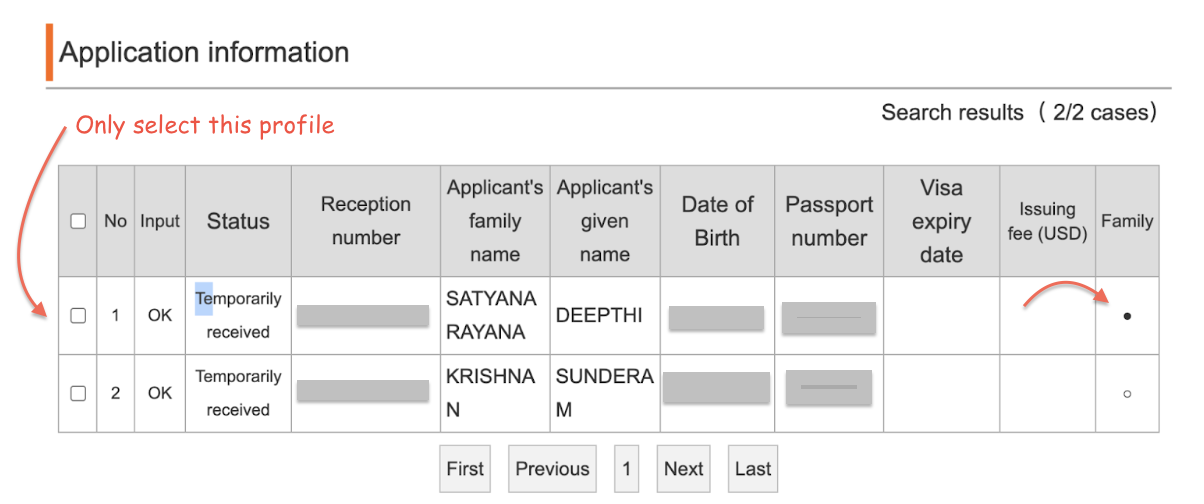
At the end of your own application form, before you submit, there is an option to Save and Add a Family Member. This is easy to miss. If you click past it and submit only your application, you'll need to delete the entire application and start over to reach that screen again.
Complete the family member's application
After saving your application and choosing to add a family member, you'll fill in their details separately. Their application is linked to yours but is treated as a separate submission. Upload all their documents including the signed authorization letter.
Submitting - only select your application
When you reach the submission screen, you'll see both applications listed. The primary applicant's entry has a solid dot; the family member's has a hollow dot. Select only your application to submit. If you try to select both and submit together, it errors out.
Submit the family member's application separately
After your application goes through, go back to the application list and submit the family member's application separately. Both will be processed together at the consulate since they're linked.
Check for the confirmation email
You should receive an email with subject "JAPAN eVISA [Notification of temporary reception of application]" and a receipt number. If you don't receive it within a few hours, check your spam folder.
📸 Screenshot: Application list with solid/hollow dots
Shows how to identify which application to select for submission
The full timeline - what happened and when
This was our actual experience. Your dates will differ but the sequence of statuses should be similar.
Submitted application
Application accepted into the system. Got a confirmation email with receipt number.
❌ Application rejected
Email arrived the very next day. Reason: day-by-day itinerary didn't match flight dates. Had to start a completely new application.
Resubmitted (second attempt)
New application with corrected itinerary. Confirmation email received with new receipt number.
Processing confirmation
Received email saying "we have received your visa application and will proceed." Also told us to expect a fee notice email on a specific date. Explicitly said: do not call or email us.
Fee payment request
Email arrived exactly on the scheduled date with credit card payment instructions. Fee: ¥1,664 for 2 people (~$11 total at the time).
✅ Visa issued
Email arrived the next day: "JAPAN eVISA [Notification of electronic visa issuance]". Each applicant gets a separate issuance number. Visa is displayed digitally - no sticker in passport.
How to show your visa at the airport
Screenshots and printed PDFs are NOT accepted. You must show it live on the eVisa portal on your phone. You can connect to the wifi at the airport once you arrive.
How to display the visa issuance notice
Full instructions with screenshots are in the official guide: How to display visa issuance notice (PDF, official)
Things I wish someone had told me
Your day-by-day itinerary must match your flights exactly
This is the most common rejection reason. Day 1 should be your departure from your country. Your last day should be your departure date from Japan.
The fee notice date is given to you in advance
Our email told us on Mar 16 to expect the fee notice on Mar 23. That date was accurate. The visa was issued within 24 hours of payment - exactly as described.
Don't call or email asking for status updates
The consulate explicitly asks you not to. The email tells you what to expect and when. Trust the process - they're faster than their communication style suggests.
Add the family member during your application - not after
The 'Add family member' option appears at the end of your own application form. If you miss it, you have to delete and restart. There's no way to add it post-submission.
For future Japan trips, reapplying is easy
The whole process is online and took about 12 days for us. Since single-entry is cheap (~$6) and fully digital, there's no reason to stress about multiple-entry unless you're doing frequent back-and-forth trips.
Next step before you fly
Register on Visit Japan Web before you board
Once your visa is approved, the next thing to do is register on Japan's official Visit Japan Web service. It lets you complete immigration and customs procedures online and generates a QR code you show at the airport. Do it at the gate — not after landing. You'll need your passport, visa issuance number, and flight details.
Read the full guide →Useful links
The Japan eVisa process is genuinely fast and straightforward.
Safe travels ✈️
- Dee